Tampilkan postingan dengan label Sofwer Dan Hadwer. Tampilkan semua postingan

Senin, 24 September 2012

Jual aplikasi dan 100 theme all tipe Blackberry Rp.200.000 1 CD Full,

Jual 450  aplikasi  dan 100 theme all tipe Blackberry Rp.200.000  1 CD Full,

free ongkir Hub .085248986261

format sms :

Nama , Alamat,Nomor yang bisa dihubungi

pengirimiman melalui  JNE atau TKI

VIA Transaksi Melalui BCA

7895129011

Ahmad Firdaus


Kamis, 16 Februari 2012

Cara mudah Mengatasi Kerusakan Blackberry

Cara Mengatasi Kerusakan Blackberry – Kali ini saya akan menjelaskan Cara Mengatasi Kerusakan Blackberry, Blackberry anda mengalami kerusakan ?? silahkan anda baca tips tips mengenai cara mengatasi blackberry yang rusak berikut ini. Yang namanya barang elektronik pasti tidak akan lepas dari kerusakan, termasuk juga si smartphone blackberry.
Kerusakan pada blackberry yang akan dibahas dalam artikel ini yaitu kerusakan blackberry yang mempunyai indikasi terdapat layar putih dengan pesan kesalahan, layar gelap hanya LED saja yang menyala atau bahkan hanya layar gelap belaka (mati total atau sering disebut matot).
Secara garis besar penyebab matinya Blackberry dapat dibagi menjadi 2 faktor yaitu:
  1. Kerusakan Hardware
  2. Kerusakan Software
Artikel yang disajikan blog ini mencoba mendiagnosis permasalahan apakah diakibatkan oleh permasalahan hardware ataupun permasalahan software. Ada beberapa usaha yang dapat dilakukan untuk mengatasi permasalahan ini yaitu copot battery, tukar battery.
cara Mengatasi Kerusakan Blackberry
Copot Battery
Usaha pertama yang perlu dilakukan adalah dengan melakukan “Battery Pull” atau copot battery. Hal ini dilakukan dengan cara melepas baterai dan menunggu sekitar lebih kurang 3 menit sebelum memasang kembali battery. Apabila tidak berhasil, coba lepas SIM Card dan Media Card sebelum memasang kembali battery. Apabila blackberry masih tidak dapat menyala, coba lakukan tukar battery atau Recharge battery yang caranya akan dijelaskan berikut ini.
Tukar Battery
Usaha tukar battery bertujuan untuk memastikan bahwa permasalahan bukan diakibatkan oleh battery, hal yang dapat dilakukan adalah dengan mencoba memasang baterai yang “good” dan “fully recharge” ke blackberry yang bermasalah. Apabila blackberry dapat menyala, ganti atau charge ulang battery menggunakan cara berikut ini. Apabila tidak berhasil, artinya permasalahan bukan disebabkan oleh battery, coba dengan me-”reload” OS.
Recharge Battery
Usaha ini mencoba melakukan charging pada battery yang sudah habis total.
  1. Cabut Baterai, SIM Card, Media Card, biarkan terbuka
  2. Jalankan Desktop Manager
  3. Sambungkan Blackberry dengan PC menggunakan kabel USB
  4. Tunggu sampai muncul gambar battery disilang
  5. Pasang battery tanpa melepas sambungan blackberry dengan PC
  6. Tunggu sampai Blackberry menyala, biarkan charge sampai beberapa garis battery
  7. Cabut koneksi, segera charge dengan charger
Reload Sistem Operasi
Langkah pertama adalah mencoba me-load sistem operasi Blackberry menggunakan bantuan command prompt (lihat Repair Nuked Blackberry). Install Desktop Manager pada PC, kemudian install OS menggunakan OS “bawaan” yang biasanya disertakan di dalam CD yang terdapat di dalam kardus Blackberry. Pastikan OS lain yang sudah diinstall di dalam PC dihapus terlebih dahulu.
Delete file Vendor.xml yang terdapat di dalam folder “Program Files/Common Files/Research in Motion/AppLoader”.
Pastikan Desktop Manager tidak “Running” di dalam Windows, apabila Desktop Manager “Running”, Matikan autostart dan restart Windows. Kemudian ikuti langkah langkah di bawah ini:
  1. Jalankan Command Prompt (Ketik Alt+R kemudian ketik cmd + Enter)
  2. Ketikkan pada Command Prompt
    CD (Tekan Enter)
    CD PROGRA~1 (Tekan Enter)
    CD COMMON~1 (Tekan Enter)
    CD RESEAR~1 (Tekan Enter)
    CD APPLOA~1 (Tekan Enter)
    LOADER /NOJVM (Tekan Enter)
  3. Tunggu sampai selesai
  4. Restore Backup anda dengan Desktop Manager apabila proses loading firmware selesai
Apabila cara ini masih belum berhasil, kemungkinan besar permasalahan Blackberry disebabkan oleh kerusakan Hardware.
LED Error Code
Kode kedipan lampu LED pada saat awal loading blackberry menunjukkan suatu nilai biner yang menginformasikan pesan dari bootROM. Kode ini ditampilkan dalam bentuk kedipan lampu led berwarna merah,
biner 1 ditunjukkan dengan nyala kedip (lampu merah) sedangkan biner 0 ditunjukkan dengan tidak nyalanya led (off). Apabila led menyala secara kontinyu, ini merupakan pesan sedang melakukan security wipe, apabila led menyala kontinyu tidak pada saat melakukan security wipe, ini mengindikasikan adanya kerusakan hardware.
  • 1 (desimal = 1) Bukan problem, kode ini adalah normal saat restart
  • 11 (desimal = 3) Tidak ada sistem operasi di dalam blackberry, lakukan reload sistem operasi (pakai jurus /nojvm)
  • 101 (desimal = 5) Bad OS CRC
  • 111 (desimal = 7) Missing OS CRC
  • 1011 (desimal = 11) Missing OS Trailer
  • 1101 (desimal = 13)OS Not Signed, coba loading OS kembali
  • 1111 (desimal = 15) OS Signature Invalid, coba loading kembali OS dan biarkan mati tanpa baterai selama hampir 30 menit, kemudian coba hidupkan kembali. Apabila tetap muncul pesak kesalahan, coba lakukan penggantian flash.
  • 10101 (desimal = 21) Unknown Flash Manufacturer, coba lakukan penggantian flash
  • 10111 (desimal = 23) Flash Initialization Problem, coba lakukan penggantian flash
  • 11011 (desimal = 27) Flash Erase Failure ,coba lakukan penggantian flash
  • 11101 (desimal = 29) Flash Operation Out Of Range
  • 11111 (desimal = 31) Bad BootROM CRC, coba lakukan penggantian flash
  • 101011 (desimal = 43) USB Driver Error
  • 101101 (desimal = 45) No BootROM CRC
  • 101111 (desimal = 47) Flash Write Failure, coba lakukan penggantian flash
  • 110101 (desimal = 53) Invalid Memory Configuration Table
  • 110111 (desimal = 55) Password Not Initiated
  • 111011 (desimal = 59) RAM Initialization Problem, coba lakukan penggantian flash
  • 111101 (desimal = 61) Cache No Pages Free
  • 111111 (desimal = 63) Cache Invalid Page Type
  • 1010101 (desimal = 85) Random Number Failure
  • 1010111 (desimal = 87) OSStore Failure
  • 1011011 (desimal = 91) Security Init Failure
  • 1011101 (desimal = 93) NAND failure
  • 1011111 (desimal = 95) General Assert Failure
  • 1101011 (desimal = 107) GPIO failure
  • 1101101 (desimal = 109) Runtime library failure
  • 1101111 (desimal = 111) Exception: undefined isntruction
  • 1110101 (desimal = 117) Exception: SWI
  • 1110111 (desimal = 119) Exception: Prefetch Abort
  • 1111011 (desimal = 123) Exception: Data Abort
  • 1111101 (desimal = 125) Exception: Reserved
  • 1111111 (desimal = 127) Exception: IRQ
  • 10101011 (desimal = 171) Exception: FIQ
JVM Error Code
  • 101 Internal JVM error.
  • 102 Invalid code in file system. The .cod files in the handheld have been checked for modification and it has been determined that there is a problem with one or more .cod files.
  • 103 The starting address for the boot .cod file cannot be found. This might mean that a boot .cod file has not been installed on the handheld, or that its format is invalid or corrupt.
  • 104 An uncaught Java exception was thrown in the Java code and diagnosed by the JVM. Execution can be continued or the handheld can be attached to a debugger on a desktop through a serial or USB cable. The event log should contain the traceback of the thrown exception.
  • 105 An OS file system API returned an error status for a certain operation. This can indicate a corrupt file system or an error in the JVM.
  • 106 An error has been detected in the graphics system of the handheld.
  • 107 Internal JVM error.
  • 108 Internal JVM error.
  • 109 Internal OS error.
  • 110 Non-idle event downtime error. A problem has been detected in the accumulation of JVM down time that represents how long the JVM has been idle. This indicates an error in either the OS code or the JVM code.
  • 200 Application manager threw an uncaught exception. The application manager event thread threw an uncaught exception and so cannot continue running.
  • 201 Initialization of the cryptographic system failed and the handheld cannot continue to operate.
  • 202 An attack on the key store has been detected, and the handheld cannot continue to operate.
  • 203 The application manager console process, usually the Home screen ribbon, has failed, like due to an uncaught exception.
  • 501 Internal error.
  • 502 All processes exited. The last Java process has terminated, and there is nothing left to execute.
  • 503 Internal error.
  • 504 Internal error.
  • 505 Internal error.
  • 506 An uncaught Java exception was thrown in the initial VM Java thread thus killing the only live thread in the system. The event log contains the traceback for the exception.
  • 507 A dependency on a .cod file could not be satisfied due to a missing .cod file. Load the missing .cod file onto the handheld.
  • 508 Invalid object. A problem has been detected with a debugger command to the VM.
  • 516 Error occurred during garbage collection, which might indicate a corrupted file system.
  • 510 All threads are waiting on objects, which results in a deadlock. The system cannot recover from this state since no thread can release a lock.
  • 511 A problem has occurred during debugging.
  • 515 The reachable objects form a group that cannot be represented properly by the VM because there are too many objects or the total size of the objects is too large.
  • 516 When committing a persistent object, the VM found that the persistent store id counter has reached its limit. The object was not committed.
  • 517 An inconsistency has been detected in the VM persistent object store.
  • 518 Internal error.
  • 519 Internal error.
  • 520 Internal error.
  • 521 Indicates that Object.wait() has been executed by a thread that holds a lock on another object; occurs only in simulator if the JvmDebugWaits application switch.
  • 522 A thread has acquired two locks on objects in an order that doesn’t match the order that previous locks for the two types were acquired, which indicates a future potential deadlock situation; reported only in the simulator when the JvmDebugLocks application switch is set.
  • 523 A critical Java process has died and the device cannot continue to operate normally.
  • 524 An object has been marked as recovered by the Low Memory Manager but it was not freed during a garbage collection. This is only checked in the simulator under the control of the JvmDebugLMM application switch.
  • 525 Bad persistent object. An auto-commit operation during a garbage collection has detected a non-persistent object reachable from the persistent store root. The type of the object has been output into the event log.
  • 526 The class definition for java.lang.Object cannot be found.
  • 527 The class definition for java.lang.String cannot be found.
  • 528 The file system is corrupted. Data on the handheld is unrecoverable.
  • 529 The file system is corrupted. An attempt is going to be made to recover data, but some data might be lost.
  • 530 Internal JVM error.
  • 531 Flash memory has been exhausted.
  • 532 A JVM assertion has been violated. This error can occur only in the simulator, not on an actual handheld
Selamat mencoba Cara Mengatasi Kerusakan Blackberry. Dan semoga blackberry anda bisa segera normal lagi, tak lupa kami ucapkan trimakasih anda telah mengunjungi artikel kami berjudul Cara Mengatasi Kerusakan Blackberry .
Sumber : http://www.jerukhitam.com/mengatasi-kerusakan-pada-blackberry.html


Jika Copas, Saya Harap Sobat tidak menghilangkan Link ini, Jika tidak ingin saya copas Balik. (Don't Remove This Link..!!) » Sumber : http://m-wali.blogspot.com/2011/12/cara-mengatasi-kerusakan-blackberry.html#ixzz1mYxwp0Bu

Kamis, 29 Desember 2011

Cara jitu meningkatkan kecepatan download

Cara ini bisa mempercepat download hingga 3x lipat. Ga percaya!? coba aja! Cara meningkatkan kecepatan download kali ini terbagi dalam beberapa aspek. Wew, apa saja tuh! Berikut cara meningkatkan kecepatan download Penasaran! Mau?
Caranya begini :
1. Sesuaikan dengan koneksi internet yang ada.
Sebelum kita download file apa saja, kapan saja dan dimana saja. Kita harus menyesuaikan bandwidth koneksi internet yang kita punya. Kalo koneksi kita memakai dial-up, apalagi yang paket unlimited, provider tentunya membatasi (quota bandwidth) sesuai dengan paket yang dipilih. So, gunakanlah bandwidth dengan bijak. Berbahagialah bagi mereka yang mendapatkan bandwidth gratisan. Hehehe ..
2. Sesuaikan waktu mendownload.
Dari beberapa pengalaman yang ada. Waktu mendownload sangatlah berpengaruh. Apalagi buat mereka-mereka yang bekerja / sekolah. Carilah waktu yang pas untuk mendownload. Jangan waktu jam kerja! Biasanya waktu yang cocok untuk mendownload itu malam hari. Ketika orang-orang lagi pada tidur / bikin anak. Pokoknya cari waktu yang sepi! hahahaha
3. Tentukan file hosting.
Menentukan file hosting (situs penyimpanan file) sangatlah penting! Cari file hosting yang mempunyai kriteria download secepat download server lokal.  merekomendasikan Indowebster, Jumbofiles dan Mediafire sebagai filehosting terhandal selama ini. Dalam membuka file hostingnya sendiri juga mesti diperhatikan, jangan biarkan iklan-iklan membuat kita bingung. Untuk menghilangkan iklan-iklan yang menempel pada file hosting, gunakanlah addon Adblock / addons yang sejenis.
4. Siapkan software downloader.
Banyak software downloader yang beredar didunia maya. Pinter-pinterlah memilih software downloader yang tepat.  Internet Download Manager (IDM) sebagai software downloader terbaik. Bagi yang belum punya IDM, bisa download disini. Gratis! Sedangkan untuk cara menjadikan IDM full version tanpa patch, bisa klik disini.
5. Setting IDM
- Buka IDM anda, pilih menu Downloads > Options.
- Pilih tab menu Connections.
- Pada Connection Type/Speed, pilih Other. Pada kolom disampingnya masukkan angka 999999999.
- Pada Default max. conn. number, pilih angka terbesar yaitu 16. Kalau sudah klik OK.
- Masih di IDM, buka menu Downloads > Speed Limiter > Turn Off.
6. Pintar-pintahlah dalam browsing di google / mesin pencari lainnya.
Dalam mencari file yang kita inginkan melalui google/mesin pencari lainnya, kita harus tahu cara browsing yang tepat dan akurat. Hehehe, untuk cara browsing yang benar bisa dilihat disini.
7. Putus’kan koneksi orang lain.
Hahaha, cara ini sangat tidak direkomendasikan. Tapi kalau kepepet, ya monggo ! hehe. Bila koneksi internet anda menggunakan wireless (hotspot) ataupun di warnet, anda bisa menjahili orang lain disekitar anda. Caranya ?? Cari aja di mbah google! hahaha

cara mempercepat download di ziddu.

Apa itu ziddu ? Ziddu merupakan salah satu file hosting gratis yang banyak digunakan para blogger untuk meng-uplaod file. Cara download yang akan Di jelaskan kali ini insya allah bisa menaikkan kecepatan download hingga 30 %. Wui, keren ! Caranya gimana ? Penasaran ! Mau ?
Berikut cara mempercepat download di ziddu :
1. Gunakan add-ons Adblock untuk menghilangkan iklan / banner di ziddu yang mengganggu.
2. Gunakan software stopzilla untuk menghilangkan pop-up dari ziddu, bagi yang belum punya bisa download disini.
3. Matikan / Disable-kan Java Script pada web browser anda. (Bagi anda pengguna firefox, pilih menu Tools > Options > Tab Content > Un-centang pada Java Script )
4. Login ke account ziddu anda terlebih dahulu. Bagi yang belum punya account / belum register, silahkan klik disini.
5. Gunakan software Internet Download Manager. Bagi yang belum punya, bisa download disini.
Segini dulu tutorial cara mempercepat download di ziddu. Semoga Bermanfaat...

Selasa, 27 Desember 2011

Memperkuat sinyal modem dengan sendok


modem GSM 3G yang awalnya putus asa dengan koneksi internet. Sebabnya, sinyal yang didapat di rumah saya hanya GPRS. Padahal modem tersebut dan operatornya menyediakan koneksi HSDPA yang kecepatannya dua tingkat di atas GPRS.Setelah cukup lama merana cinta HSDPA n’ setelah saya browsing dan terus browsing, mencari dan terus mencari, saya menemukan sangat banyak banyak,.. antena untuk penguat sinyal modem, semua nya emang sangat bagus2, tapi menurut saya harga nya masih terlalu mahal buat anak koz seperti saya ni, setelah saya pikir2, & karna mgkin, hanya bisa mikir mlihat harga2 antena yg cukup mahal, akhirnya saya mencoba2 untuk membuat antena sendiri, dan akhirnya saya menemukan antena yang tepat untuk meninggikan sinyal 3G dengan harga yang sangat terjangkau, yaitu antena yang terbuat dari sendok.
Bahan Sendok RCS :
  • Sendok Tipis
  • Kabel UsB ( untuk lebih hemat lagi, modem langsung di hubungkan ke UsB yg di komp juga bisa, tanpa memakai kabel UsB) ^.^
  • gabus (g’ perlu klo modem lngsung di colok ke komp)

Kabel USB:
membuatnya pun sangat mudah dan hanya membutuhkan 3 bahan untuk hasil yg maksimal, sendok, gabus (sterofoam) dan kabel UsB.

cara pertama, bentuk pegangan sendok, sesuai dengan ukuran modem, dan setelah sendok di bentuk sesuai dengan bentuk/sesuai dengan ukuran modem, lang kah berikutnya adalah memasang sendok ke Modem, dan setelah itu pasang juga kabel UsB nya, pada modem-komputer. hasilnya bisa di lihat pada gambar di atas.
Selamat mencoba,….
Semoga Bermanfaat

Sabtu, 09 Juli 2011

Cara Hack Password Smadav

Cara Hack Password Smadav ini sangat berguna bilamana anda Lupa Password Smadav anda. Sehingga anda tidak dapat menggunakan tool dan menyeting Smadav. Fitur password protect ini hanya ada pada Smadav Pro. Seperti yang kita ketahui, fitur ini berfungsi agar tidak sembarang orang dapat mengubah-ubah settingan dan menggunakan tool Smadav. Jadi hanya Si Admin saja yang bisa mengotak-atik settingannya. Namun bagaiman bila si Admin lupa passwordnya? Nah,berikut mari kita ulas step by step.

Cara Hack password Smadav
Berikut caranya :

  1. Ketika anda mendapati bahwasanya anda lupa password Admin Smadav, tutup saja Smadavnya. Lalu buka Registry Editor (Start – Run – ketik “regedit” – Enter) dan buka keyHKEY_CURRENT_USER\Software\SMADAV. (huruf “A” yang didepan “D” itu seharusnya segitiga, bukan “A”. Tapi karena itu karakter ascii jadinya tidak muncul)
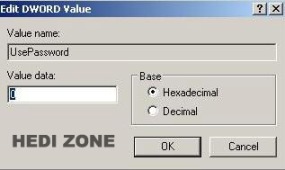
  2. Cari string UsePassword, klik 2 kali dan ganti value yang semula 1 menjadi 0.
    Cara Hack password Smadav
    Cara Hack password Smadav
  3. Sekarang itu buka kembali Smadav-nya, anda tidak akan dimintai password. :)
  4. Lalu buka menu Setting, centang pada opsi “Gunakan password untuk admin Smadav” dan klik Edit password untuk mengganti passwordnya dengan yang baru.
    Cara Hack password Smadav
  5. Masukkan password anda yang baru dan klik Save. Sekarang passwordnya sudah berhasil diganti. :)
    Cara Hack password Smadav

Nah, sekarang coba anda otak-atik registry software lainnya. Barangkali menemukan sesuatu ya

Download app dan Game android


INFORMATION
Release Group: P2P
Release Name: Android Apps and Games Pack Feb 27 2011
Release Date: 27th Feb 2011
Filename: Android Apps and Games Pack Feb 27 2011.rar
Filesize: 312.561 MB (327,744,464 bytes)
Type: Applications | Games

Here is the latest Android Application and Game Pack Includes:

Aplications:

anMoney (1.4.21.20110127).apk
Applanet (2.7.8).apk
Beautiful Widgets (3.3.8).apk
Camera360 Ultimate (1.6.10).apk
CircleLauncher (1.5.7).apk
Extended Controls (5.2.3).apk
Folder Organizer (3.2.11).apk
Gentle Alarm (2.6.11).apk
Honeycomb Boot Live Wallpaper (2.0).apk
iDisplay (1.0.21).apk
iTap Keyboard (1.1.00 EA).apk
Metro UI Pro (1.4.4).apk
MLB.com At Bat 11 (1.0).apk
MP3 Music Download (2.5.3).apk
MySportTraining (1.3.4).apk
Nexus Revamped Pro LW (1.98.06).apk
PhotoWonder (1.0.0).apk
Pure Calendar widget (agenda) (2.5.0).apk
Rail Planner Live (1.6.7).apk
Scanner Radio Pro (3.0).apk
SystemApp Remover (4.14) ROOT REQ.apk
Task Manager – Donate (6.1).apk
Thumb Keyboard (2.9.3).apk
Titanium Backup root (3.7.2) ROOT REQ.apk
Train Times UK (3.1.5).apk
TWIDROYD PRO for Twitter (5.0.2).apk
Windows Phone Android (1.3.1).apk

Games :
BATTLE BEARS Extras Add On (1.0.9).apk
BATTLE BEARS- ZOMBIES!- (1.0.6).apk
BitBlocks (1.86).apk
BreakTheBlocks Full (5.0.623).apk
Chesspresso v1.1.1.apk
Dungeon Defenders- FW Deluxe v5.11.apk
Farm Tower Pro (1.2.7).apk
Fix It (1.0).apk
Flick Flight (2.0).apk
Flight Control (3.0).apk
FPse for android (0.10.9) PS EMU.apk
Garden Of Weeden (4.1.8.1).apk
Golf Battle 3D (1.1.1).apk
HexDefense v1.2.apk
Homerun Battle 3D (1.4.2).apk
Humans vs. Aliens (1.1).apk
MiniSquadron! (1.18).apk
Mrs Block (1.2).apk
MX Moto (1.6.2).apk
My Pocket Plane (1.2).apk
Office Rush (1.0.7).apk
Pinball Ride (1.1).apk
Pool Break Pro (1.7.5).apk
Shoko Rocket (1.13).apk
Squibble (1.0 build 744).apk
Star Traders RPG Elite (3.4.7).apk
Sword Requiem v1.0.4.apk
TurboFly 3D (1.15).apk
Weed Farmer (1.008).apk
DOWNLOAD LINK :
Filesonic
www.filesonic.com/file/209851251/Android.Apps.and.Games.Pack.part1.rar
www.filesonic.com/file/209903301/Android.Apps.and.Games.Pack.part2.rar
www.filesonic.com/file/209895802/Android.Apps.and.Games.Pack.part3.rar
www.filesonic.com/file/209893532/Android.Apps.and.Games.Pack.part4.rar

Freakshare
freakshare.com/files/8mq24bpa/Android.Apps.and.Games.Pack.part1.rar.html
freakshare.com/files/kku0cay4/Android.Apps.and.Games.Pack.part2.rar.html
freakshare.com/files/g0knsl3u/Android.Apps.and.Games.Pack.part3.rar.html
freakshare.com/files/828yugcm/Android.Apps.and.Games.Pack.part4.rar.html

Fileserve
www.fileserve.com/file/A4FSmwV/Android.Apps.and.Games.Pack.part1.rar
www.fileserve.com/file/QmnJ32e/Android.Apps.and.Games.Pack.part2.rar
www.fileserve.com/file/Z9fbvw8/Android.Apps.and.Games.Pack.part3.rar
www.fileserve.com/file/tCTS4cR/Android.Apps.and.Games.Pack.part4.rar

Cara Melacak Handphone yang hilang/dicuri

Nilai sebuah ponsel tidak hanya ditentukan oleh tipe dan merek Ponsel, namun juga data-data penting, rahasia dan mungkin juga nilai sejarah yang melekat padanya. Bayangkan jika ponsel dicuri orang, setelah itu dimatikan. Bagaimana cara melacaknya?
Blogging Tutorial and Business Stuff
Astaga.net,Life style on the net
Ketika ponsel berpindah tangan dan si tangan jahil mengganti SIMcard. Maka kelebihan aplikasi ini, secara diam-diam dia akan mengirim pesan kepada nomor yang sudah disetting sebelumnya. Misalkan nomor cadangan / orang terdekat kita. Nah setelah mengetahui nomor baru si pelaku, anda bisa menyiasati untuk melacak atau membuat prjanjian agar mengembalikannya dengan iming-iming imbalan yang telah disepakati misalnya.


Langkah Pemakaian :

Download versi trial PhoneBAK Mobilephone dari http://www.handango.com/

servlet/d/phonebakmobile.zip?s=308&p=210832&secw=2c6002d2 &email=

Unzip file, akan muncul 4 buah folder dan 4 buah file.

Transfer file 'PhoneBak-Mobilephone.sis' ke ponsel. Jangan lupa, sesuaikan dengan tipe ponsel anda ( lihat kompatibilitas ).

Jalankan aplikasi. Dengan membuka menu > pilih PhoneBak > options >open. Kali pertama dijalankan, aplikasi meminta anda mengisikan 'password', isikan dengan angka '1234' (ini merupakan password default). Anda nanti harus merubahnya.

Lakukan pengaturan dengan mengisi 'send1' dengan nomor lain anda, sebagai tujuan pengiriman pesan bila SIM card diganti dengan SIM card yang lain. Begitu juga dengan 'send2' kita dapat mengisi nomor tersebut secara internasional.

Selanjutnya ganti isian dari 'customize your message' dengan kalimat yang kita inginkan. Misalnya 'Hp ini telah dicuri orang' Jangan lupa untuk menyimpannya (save) dengan membuka 'options' > 'save'.

Lakukan pengujian dengan mengisi SIM card pada ponsel tersebut dengan SIM card yang lain. Bila nomor yang terisi pada 'send1' mendapat pesan singkat yang telah anda isi sebelumnya, berarti aflikasi berjalan normal.

Ketika aplikasi diatur pada posisi 'enabled', setiap kali ponsel dihidupkan, aplikasi akan memeriksa informasi SIM card. Jika SIM card itu tidak dikenali, kontan 2 buah sms akan ia kirim. satu untuk nomor lokal (send1) satu lagi untuk nomor khusus (send2).

Sedangkan pesan singkat akan berisi informasi SIM card (IMSI), nomor model ponsel (IMEI), cellID dan kode lokasi, cukup lengkap kan?

Selain itu ketika aplikasi dijalankan, akan muncul permintaan pingisian password, jika password yang diisikan salah, aplikasi langsung mengirim 2 pesan lagi.

Bila ingin membeli full version aplikasi ini, anda dapat mengunjungi situs http://www.bak2u.com/activatePhonebak.php

Kompatibilitas :

Symbian OS versi 7.0 : Nokia 3230, 6260, 6600, 6620, 6670, 7610,

Panasonic X700, X800, Samsung SGH-D710, SGH-D720 dan SGH-D730.

Symbian OS versi 8.0 : Nokia 6630, 6680, 6681, 6682 dan Lenovo P930.

Symbian OS versi 8.1 : Nokia N70, N70(Musik Edition), N90 dan Samsung SGH-Z600,

Symbian OS versi 9.0 : Nokia E50, E60, E61/E61i, E62, E65, E70, N71, N73, N75, N76,

N77, N80, N90, N91, N92, N93/93i, N95, 3250, 5500 Sport, 5700, 6110 Navigator, 6120, 6290,

Samsung SGH-i400, SGH-i520, dan LG KS10 JoY

Rabu, 08 Juni 2011

istilah bahasa komputer dan internet

Adapun dalam ulasan kali ini sesuai dengan judulnya, memberikan daftar lengkap istilah yang disingkat dalam komputer disertai makna dari kepanjangannya. Mungkin saja beberapa telah kita ketahui dan otomatis ada pula yang belum pernah ditemui. Berikut singkatannya dari A sampai Z, yaitu :

— A —
ACPI – Advanced Configuration and Power Interface
ACR – Advanced Communications Riser
ADC – Analog to Digital Converter
ADPCM – Adaptive Differential Pulse-Code Modulation
ADSL – Asymmetric Digital Subscriber Line
AGP – Accelerated Graphics Port
ALI – Acer Labs, Incorporated
ALU – Arithmetic Logic Unit
AM – Active Matrix
AMD – Advanced Micro Devices
AMR – Audio Modem Riser
ANSI – American National Standards Institute
APM – Advanced Power Management
ASCII – American Standard Code for Information Interchange
ASIC – Application Specific Integrated Circuit
ASPI – Advanced SCSI Programming Interface
AT – Advanced Technology
ATA – Advanced Technology Attachment
ATAPI – AT Attachment Packet Interface
ATM – Asynchronous Transfer Mode
ATX – Advanced Technology Extended

— B —
BGA – Ball Grid Array
BIOS – Basic Input Output System
BIT – Binary Digit
BNC – Barrel Nut Connector
BNC – Berkeley Nuclear Connector
BNC – British Naval Connector
BSRAM – Burst Static Random Access Memory

— C —
CAS – Column Address Signal
CAV – Constant Angular Velocity
CD – Compact Disk
CDR – Compact Disk Recorder
CDRW – Compact Disk Re-Writer
CDTV – Commodore Dynamic Total Vision
CD-ROM – Compact Disk – Read Only Memory
CFM – Cubic Feet per Minute (ft³/min)
CGA – Color Graphics Adapter
CISC – Complex Instruction Set Computer
CLV – Constant Linear Velocity
CMOS – Complementary Metal Oxide Semiconductor
CMYK – Cyan Magenta Yellow Black
COAST – Cache On A Stick
CNR – Communication Network Riser
CPRM – Copyright Protection for Recordable Media
CPU – Central Processing Unit
CSU/DSU – Channel Service Unit/Data Service Unit
CRC – Cyclic Redundancy Check
CRIMM – Continuity Rambus Inline Memory Module
CRT – Cathode Ray Tube

— D —
DAC – Digital-to-Analog Converter
DACS – Digital Access and Cross-connect System
DAE – Digital Audio Extraction
DDC – Display Data Channel
DDR – Double Data Rate
DDR-SDRAM – Double Data Rate – Synchronous Dynamic Random Access Memory
DEC – Digital Equipment Corporation
DIMM – Dual Inline Memory Module
DIP – Dual Inline Pin
DMA – Direct Memory Access
DOCSIS – Data Over Cable Systems Interface Specifications
DRAM – Dynamic Random Access Memory
DPI – Dots Per Inch
DS/DD – Double Sided, Double Density
DS/HD – Double Sided, High Density
DSL – Digital Subscriber Line
DSP – Digital Signal Processing
DSTN – Dual Supertwisted Nematic
DUN – Dial Up Networking
DVD – Digital Versatile Disc
DVD-RAM – Digital Versatile Disk – Random Access Memory

— E —
EBps – Exabytes per second
Ebps – Exabits per second
ECC – Error Correction Code
ECP – Enhanced Capability Port
EDO – Extended Data Out
EEPROM – Electrically Erasable Programmable Read-Only Memory
EPROM – Erasable Programmable Read-Only Memory
EGA – Enhanced Graphics Adapter
EGA – Enhanced Graphics Array
EIDE – Enhanced Integrated Drive Electronics
EIAJ – Electronics Industry Association of Japan
EISA – Enhanced Industry Standard Architecture
EMI – Electro-Magnetic Interference
EMS – Expanded Memory Specification
ESDRAM – Enhanced Synchronous Dynamic DRAM
EPIC – Explicitly Parallel Instruction Computing
EPP – Enhanced Parallel Port
ESD – Electro-Static Discharge
EWSD – Electronic Worldwide Switch Digital

— F —
FC-PGA – Flip Chip Pin Grid Array
FDC – Floppy Disk Controller
FDD – Floppy Disk Drive
FDDI – Fiber Distributed Data Interconnect
FeRAM – Ferroelectric Random Access Memory
FIFO – First In First Out
FLOPS – Floating Point Operations per Second
FMD – Flourescent Multi-layer Disk
FMD-ROM – Flourescent Multi-layer Disk – Read Only Memory
FPGA – Field-Programmable Gate Array
FPM – Fast Page Mode
FPS – Frame Per Second
FPU – Floating Point Unit
FSAA – Full Screen Anti-Aliasing
FSB – Front Side Bus
FXSR – Fast Save and Restore

— G —
GART – Graphics Address Remapping Table
GB – Gigabytes
GBps – Gigabytes per second
Gbps – Gigabits per second
GDI – Graphical Device Interface
GFD – Gold Finger Device
GHz – GigaHertz
GPA – Graphics Performance Accelerator
GPU – Graphics Processing Unit
GSR – Gigabit Switched Router
GTS – GigaTexel Shader

— H —
HCI – Human-Computer Interaction/Interface
HDD – Hard Disk Drive
HIPPI – High Performance Parallel Interface
HPA – High Performance Addressing
HSF – Heat Sink and Fan
HSR – Hidden Surface Removal
HardOCP – Hard Overclocker Comparison Page

— I —
IBM – International Business Machines Corporation
IC – Integrated Circuit
ICH – I/O Controller Hub
IDE – Integrated Drive Electronics
IDSL – ISDN Digital Subscriber Line
IEEE – Institute of Electrical & Electronics Engineers
IFTTC – Integrated Fiber To The Curb
IFITL – Integrated Fiber In The Loop
IHA – Intel Hub Architecture
I/O – Input/Output
IR – Infra Red
IRQ – Interrupt Request
ISA – Industry Standard Architecture
ISDN – Integrated Services Digital Network
ISO – International Standards Organization

— J —
JBOD – Just a Bunch Of Disks

— K —
Kbps – Kilobits Per Second
KBps – KiloBytes per second
KNI – Katmai New Instructions
KVM – Keyboard Video Mouse

— L —
LASER – Light Amplified by Stimulated Emissions of Radiation
LBA – Logical Block Addressing
LCD – Liquid Crystal Display
LDT – Lightning Data Transport
LED – Light Emitting Diode
LIF – Low Insertion Force
LIFO – Last In First Out
LMA – Lightspeed Memory Architecture
LPT – Line Print Terminal
LUN – Logical Unit Number
LVD – Low-Voltage Differential

— M —
MAC – Media Access Control
MB – MotherBoard
MB – Megabyte
MBps – Megabytes Per Second
Mbps – Megabits Per Second
MC – Micro-Channel
MCA – Micro Channel Architecture
MCE – Machine Check Exception
MCGA – Multi-Color Graphic Array
MDRAM – Multibank Dynamic Random Access Memory
MEMS – Micro-Electromechanical Systems
MFLOPS – Millions of FLoating point Operations Per Second
MFM – Modified Frequency Modulation
MHz – MegaHertz
MIPS – Million Instructions Per Second
MMX – Multi-Media Extensions
Modem – Modulate/Demodulate
MTRR – Memory Type Range Registers

— N —
NAS – Network Attached Storage
NAT – Network Address Translation
NFG – Not Functioning Good
NIC – Network Interface Card

— O —
OC – Overclock (Over Clock)
OEM – Original Equipment Manufacturer
OTFT – Organic Thin-Film Transistor

— P —
PA-RISC – Precision Archetecture Reduced Instruction Set Computing
PAL – Phase Alternation Line
PAN – Personal Area Network
PAT – Port Address Translation
PBC – Pipelined Burst Cache
PC – Personal Computer
PCB – Printed Circuit Board
PCI – Peripheral Component Interconnect
PCM – Pulse Code Modulation
PCMCIA – Peripheral Component Microchannel Interconnect Architecture
PCMCIA – Personal Computer Memory Card International Association
PGA – Professional Graphics Array
PIO – Programmable Input/Output
PIXEL – Picture Element
PLD – Programmable Logic Device
PnP – Plug ‘n Play
POST – Power On Self Test
POTS – Plain Old Telephone System
PPGA – Plastic Pin Grid Array
PPP – Point to Point Protocol
PPPoA – Point-to-Point Protocol over ATM
PPPoE – Point-to-Point Protocol over Ethernet
PRAM – Parameter Random Access Memory
PROM – Programmable Read-Only Memory
PSU – Power Supply Unit
PWM – Pulse Width Modulation

— Q —
QDR – Quadruple Data Rate

— R —
RADSL – Rate Adaptive Digital Subscriber Line
RAID – Redundant Array of Inexpensive Disks
RAID – Redundant Array of Independant Disks
RAM – Random Access Memory
RAMDAC – Random Access Memory Digital Analog Convertor
RDRAM – Rambus Dynamic Random Access Memory
RGB – Red Green Blue
RIMM – Rambus Inline Memory Module
RISC – Reduced Instruction Set Computing
RLL – Run Length Limited
ROM – Read Only Memory
RPM – Revolutions Per Minute

— S —
SAN – Storage Area Network
SASID – Self-scanned Amorphous Silicon Integrated Display
SCA – SCSI Configured Automatically
SCSI – Small Computer System Interface
SDRAM – Synchronous Dynamic Random Access Memory
SDSL – Synchronus Digital Subscriber Line
SECC – Single Edge Contact Connector
SEP – Single Edge Processor
SEPP – Single Edge Processor Package
SGI – Silicon Graphics Incorporated
SGRAM – Synchronous Graphics RAM
SIMD – Single Instruction-Stream, Multiple Data-Stream
SIMM – Single Inline Memory Module
SLI – Scan Line Interleave
SLIP – Serial Line Internet Protocol
SMDS – Switched Multimegabit Data Service
SMP – Symmetric MultiProcessing
SNR – Signal to Noise Ratio
SODIMM – Small Outline Dual Inline Memory Module
SPARC – Scalable Processor ArChitecture
SOHO – Small Office Home Office
SRAM – Static Random Access Memory
SSE – Streaming SIMD Extensions
STN – Supertwisted Nematic
STP – Shieled Twisted Pair
SVGA – Super Video Graphics Array
S/PDIF – Sony/Philips Digital Interface

— T —
TB – Terabytes
TBps – Terabytes per second
Tbps – Terabits per second
TEC – Thermoelectric Cooler
TFT – Thin Film Transistor
THz – TeraHertz
TIM – Thermal Interface Material
TNT – TwiN Texel
TOPS – Theoretical Operations Per Second
TSOP – Thin Small Outline Package
TTL – Transistor Transistor Logic
TWAIN – Technology Without An Important Name

— U —
UART – Universal Asynchronous Receiver/Transmitter
UDMA – Ultra Direct Memory Access
UMA – Unified Memory Architechture
UPS – Uninteruptible Power Supply
USB – Universal Serial Bus
UTP – Unshieled Twisted Pair

— V —
VCD – Video CD
VCM – Virutal Channel Memory
VCRAM – Virtual Channel Read Access Memory
VDSL – Very High Data Digital Subscriber Line
VESA – Video Electronics Standards Association
VFD – Vacuum-Flourescent Displays
VGA – Video Graphics Array
VIVO – Video In, Video Out
VLB – VESA Local Bus
VPN – Virtual Private Network
VRAM – Video Random Access Memory

— W —
WORM – Write-Once Read-Many
WRAM – Window Random Access Memory
WYSIWYG – What You See Is What You Get

— X —
XGA – Extended Graphics Array
XMS – Extended Memory Specification
XT – Extended Technology

— Z —
ZIF – Zero Insertion Force
ZV – Zoomed Video

Sahabat Blog